Why it costs $149 when free ones exist
Free and cheap templates exist in quantity. What buyers of them write afterwards is public, and three failures recur: the sheets are not connected to each other, the arithmetic breaks once real numbers go in, and nobody documented what any of it does.
$149 buys the work of making those three things not happen — and a way to check, before you pay, that they did not:
| What buyers of free and cheap templates write afterwards | What this model does instead | Check it before you buy |
|---|---|---|
| The sheets are not connected to each other | Every statement is a formula chain back to one input sheet. The build that produces the file rejects any typed constant below the Assumptions sheet. | Change a driver in the model at the top of this page. Six months and three checks recompute. |
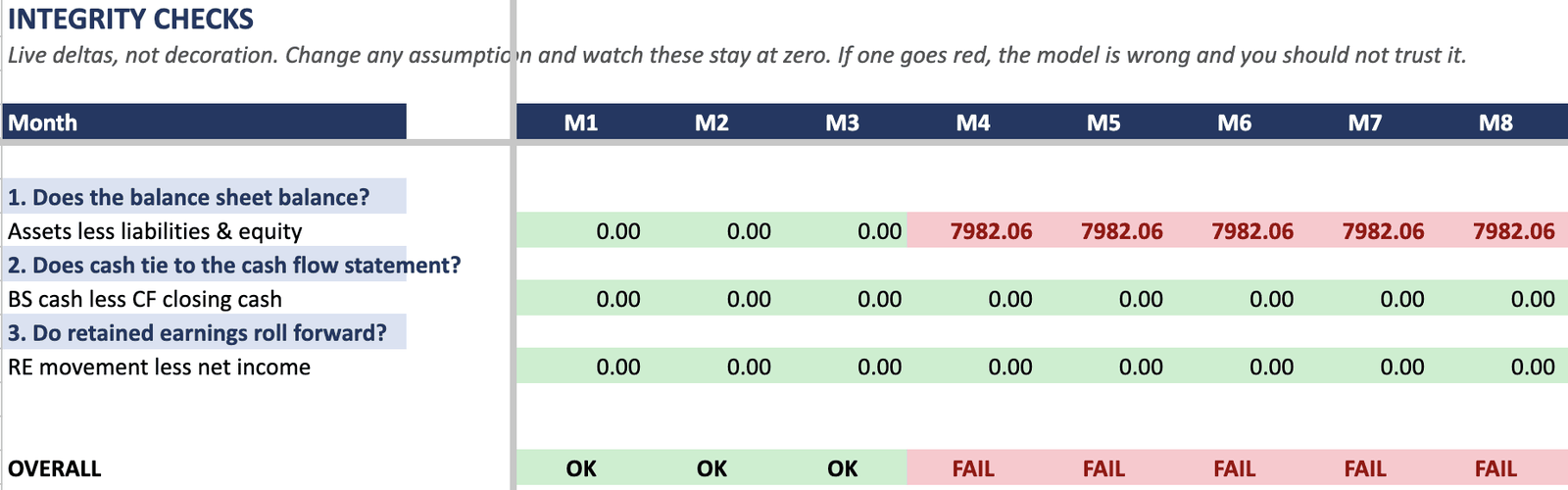
| The arithmetic breaks once real numbers go in | Three integrity tests on all 36 months, coloured by their own value, inside the file. | Press Break it at the top of the page: a typed number where a formula was, and the check fails from that month on — exactly as it does in the file. |
| Nobody documented what any of it does | A Start Here sheet, blue inputs with every other sheet protected, and a 7-page guide whose formulas are printed from the workbook itself. | Read the guide preview (PDF, free): the overview and one statement's row-by-row notes. |
If it does not do those things for you, ask for your money back within 14 days.
Everything is linked. Nothing is typed in twice.
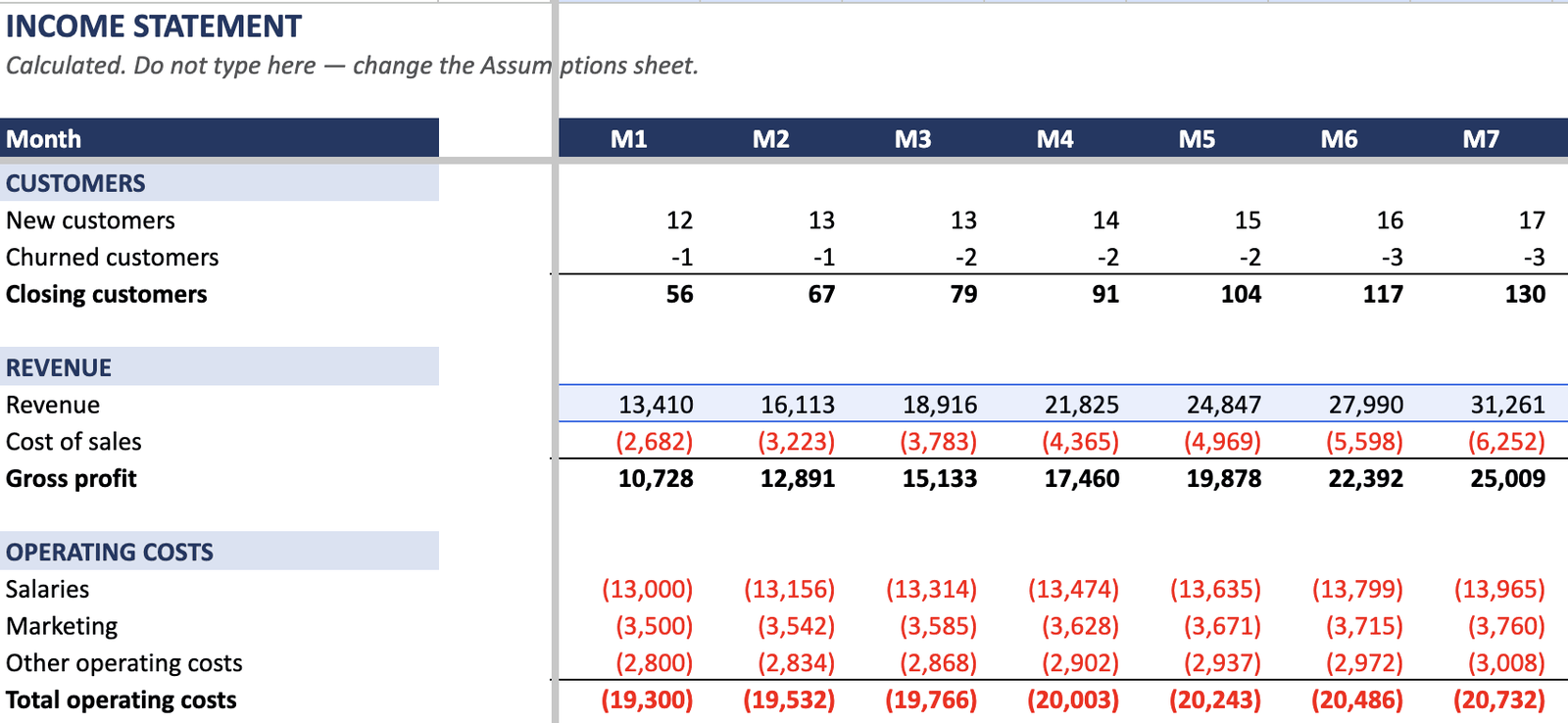
Change one number on the Assumptions sheet and all 36 months of all three statements recompute. The income statement, balance sheet and cash flow are wired into each other, not maintained side by side.
- 1,692 live formulas across the four calculated sheets.
- Zero hardcoded values below the Assumptions sheet. The build that produces the file refuses to emit it if a constant appears in a statement.
- Each month's opening balance is the prior month's closing balance, by formula. Carry-over drift measured across all 35 month transitions: 0.000000.
- No month-by-month re-entry step, and no copying figures from one tab into another.
That is the difference between a linked model and a folder of sheets that happen to sit in the same workbook. A buyer of one of the latter:
A Checks sheet that tells you when it is wrong
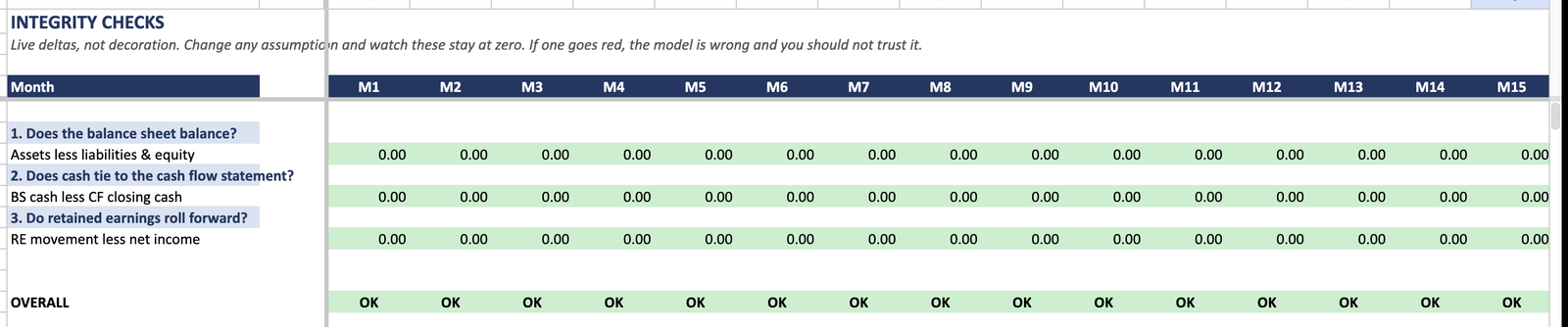
Three integrity tests, run on every one of the 36 months, each cell coloured by its own value:
- The balance sheet balances — assets equal liabilities plus equity.
- Cash on the balance sheet ties to the closing cash on the cash flow statement.
- Retained earnings roll forward — opening plus net income equals closing.
Type a number over a closing-cash or total line and that month turns red and reads FAIL — and so does every month after it, because each month opens on the last one's close. That is the point of the sheet: you are not asked to trust the model, you are shown a test you can break on purpose. (Typing a number over revenue does not fail a check; it flows through like an input. The checks catch the statements coming apart, not a changed assumption.)
Integrity was re-tested across all 36 months under Base, Upside and Downside, under five individually perturbed drivers, and with four inputs changed at once.
Three scenarios from one cell
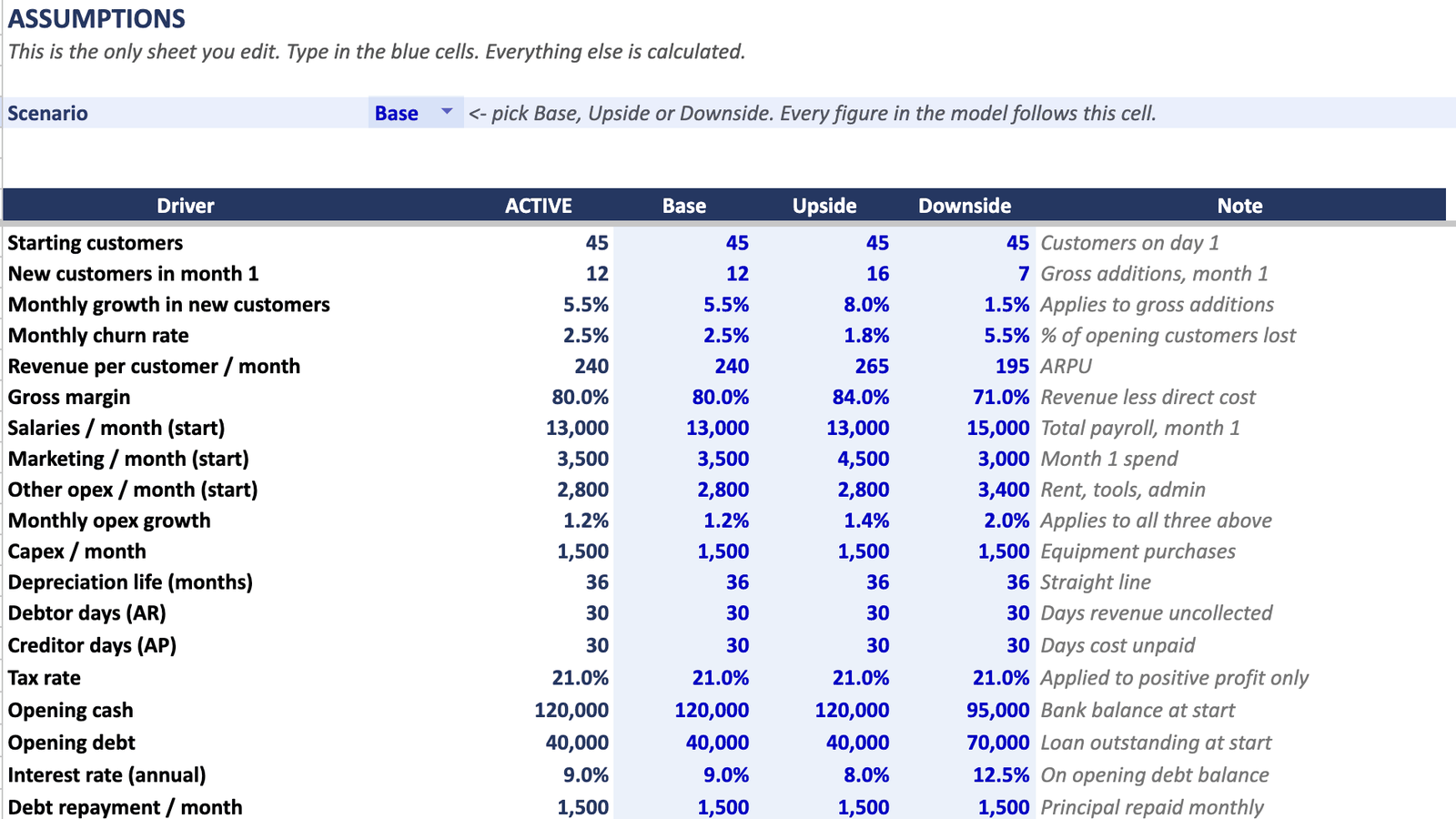
One dropdown on the Assumptions sheet switches the whole model between Base, Upside and Downside. Every statement, every month, every check follows it.
The shipped defaults are not three flavours of optimism:
| Scenario | Cash position |
|---|---|
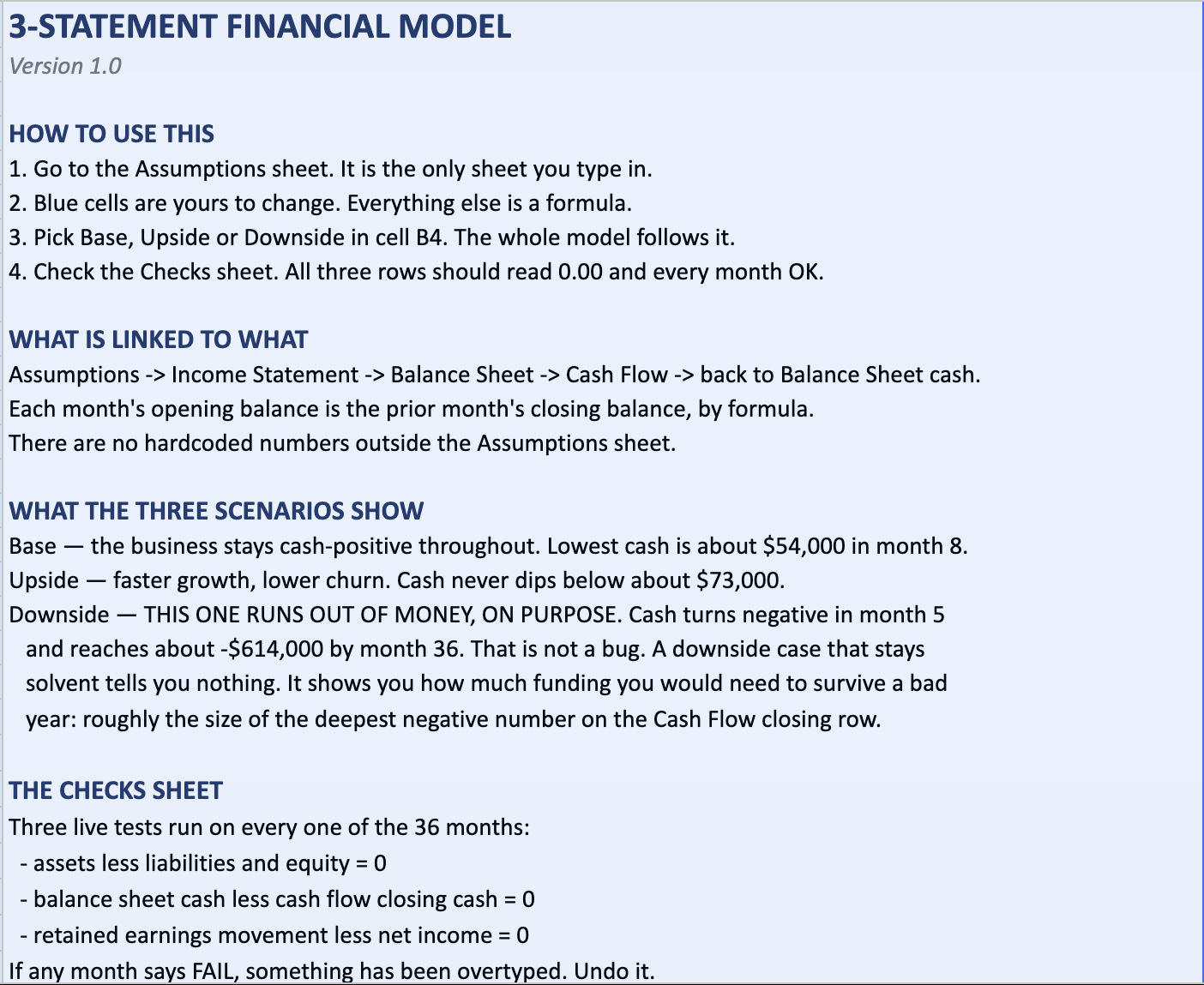
| Base | Stays cash-positive throughout. Trough of about $54,000 in month 8. |
| Upside | Never dips below about $73,000. |
| Downside | Turns cash-negative in month 5 and reaches about -$614,000 by month 36. |
The downside runs out of money on purpose, and the Start Here sheet says so. A downside case that stays solvent tells you nothing.
One input sheet, and a guide for every row
- One input sheet. Blue cells are the only editable cells. Every other sheet is protected — without a password, so you can unlock them when you want to, but not by accident on a Tuesday.
- A Start Here sheet that explains the order to work through the model in and what the shipped defaults mean.
- A 7-page Model Guide (PDF) documenting every calculated row: what it does, where it flows, what to change. The formulas printed in the guide are read out of the workbook when the guide is generated, so the guide cannot drift away from the model it describes.
- A worked example — the same model filled in for a services agency: 45 debtor days, high retainer revenue, people-heavy cost base.
No video. No 20-minute walkthrough to sit through before the file is usable.
Which cell to change, and what changing it does, is written down. The alternative, from a review of a competing Excel planner:
Who it is for, and what you can model
Who it is for. The model is built around a customer-driven business: a count of customers paying a monthly amount, growing by new additions and shrinking by churn. That fits SaaS, subscription products, memberships, agencies on retainers, and service businesses with recurring clients.
It does not natively model inventory, unit manufacturing, or project-based one-off revenue. There is no stock driver, no bill of materials, no per-project revenue line. You could bend the inputs to approximate one of those, but the model was not designed for it and this page will not pretend otherwise. If that is what you need, do not buy this.
What you can model. The Assumptions sheet holds 19 drivers, each with a Base, Upside and Downside value. That is the complete list:
| Group | Drivers |
|---|---|
| Customers and revenue | Starting customers · New customers in month 1 · Monthly growth in new customers · Monthly churn rate · Revenue per customer / month · Gross margin |
| Operating costs | Salaries / month (start) · Marketing / month (start) · Other opex / month (start) · Monthly opex growth |
| Investment | Capex / month · Depreciation life (months) |
| Working capital | Debtor days (AR) · Creditor days (AP) |
| Tax | Tax rate |
| Financing | Opening cash · Opening debt · Interest rate (annual) · Debt repayment / month |
Nineteen rows, one sheet. Anything not on that list is not an input to this model.
What is in the download
| File | What it is |
|---|---|
Financial_Model_v1.0.xlsx |
The model. Six sheets: Start Here, Assumptions, Income Statement, Balance Sheet, Cash Flow, Checks. 36 monthly periods. |
Financial_Model_v1.0_GoogleSheets.xlsx |
The same model, import-ready for Google Sheets, with import notes on the Start Here sheet. |
Financial_Model_v1.0_Example_Agency.xlsx |
The same model worked through for a services agency — 45 debtor days, high retainer, people-heavy cost base. |
Model Guide.pdf |
7 pages. Every calculated row documented. |
No macros. No VBA. No add-ins. No external links, named ranges or volatile functions. The workbook is 28 KB.
Not sure yet? Read a preview of the Model Guide (PDF, free) — the overview pages and the Income Statement's row-by-row notes. The full guide in the download covers every calculated row on all four sheets, with each formula printed from the file.
Refund
14 days, no questions asked. Email support@financialmodelkit.com and it is refunded. Questions before buying go to the same address — see the support page.
An honest note about proof
This is v1.0, released September 2026. There are no customer reviews here because there are no customers yet, and inventing them is not on the table.
What is here instead: the Checks sheet, screenshotted above, which is a test you can run and break inside the file itself; a guide that prints the actual formulas out of the workbook; and 14 days to get your money back if the file is not what this page says it is.
Questions
Does it work in Google Sheets?
Yes. The _GoogleSheets.xlsx file was uploaded to a real Google Drive account and opened with Google Sheets on 2026-09-12. All 36 months of the Checks sheet read OK, the scenario dropdown drives the model, the numbers match the Excel version, and the conditional formatting on the Checks sheet survives. One difference to know about: Excel's sheet protection does not map onto Sheets, so it is stripped from that variant rather than shipped half-working. Every function the model uses — SUM, IF, AND, MIN, MAX, ABS, ROUND, INDEX, MATCH — is supported by Sheets.
Does it work in Excel for Mac, Excel Online, LibreOffice or Numbers?
Not tested. This page will not tell you it does. It has been tested in Excel and in Google Sheets, and those are the two claims made. If you open it somewhere else and it does not behave, that is what the 14-day refund is for.
Will I have to update anything by hand each month?
No. Each month's opening balance is the prior month's closing balance by formula, and everything below the Assumptions sheet is calculated. The failure this is built to avoid is the one an Excel tracker in this category collected a 2-star review for:
I am not confident with spreadsheet formulas. Can I still use this?
The editable cells are blue and they are all on one sheet. Everything else is protected, so the ordinary mistake — typing over a formula — is hard to make by accident. The Start Here sheet gives you the order to work in, and the Model Guide documents every calculated row.
How do I know this is not generic filler?
Check it rather than trust it. Open the Checks sheet, change an assumption, and watch 36 months of three integrity tests recompute. Open the Model Guide and find the row you care about — the formula printed there is the formula in the cell, read out of the workbook at generation time.
How many months does it cover? Can I extend it?
36 monthly periods. Extending further is a drag-right across the four calculated sheets — the references back to the Assumptions sheet are absolute and will survive it.
What format do I actually receive?
Three .xlsx files and one PDF. Three of the four files are working workbooks; the PDF is the guide and only the guide. You are not buying a PDF of a spreadsheet.
What if I change my mind?
14 days, no questions. Email the support address and it is refunded. The policy is one sentence long so there is nothing to argue about.
Quoted reviews
- 3-star review, small-business bookkeeping bundle, 2026-01-04. Public marketplace review of another seller's template, quoted verbatim. ↩
- 1-star review, Excel resource capacity planner, 2026-07-24. Public marketplace review of another seller's template, quoted verbatim. ↩
- 2-star review, HR attendance tracker template, 2026-01-19. Public marketplace review of another seller's template, quoted verbatim. ↩